MCP server
This server allows you to connect your preferred Large Language Model (LLM) to SUSE Application Collection. With this integration, you will be able to ask a model to help you write a new Dockerfile, migrate an application, or design a Helm chart.
Server overview
These are the general server details, which you might need when plugging it to any AI agent:
- Server URL:
https://mcp.apps.rancher.io - Server transport:
HTTP - Additional headers:
Authorization:Basic ...(Base64 encodedusername:api-token)
Authentication
The server requires basic authentication. Make sure you already have a SUSE Application Collection account
before proceeding. To generate the Authorization header named above, encode to Base64 the string <username>:<api-token>, where:
<username>: is your SUSE Application Collection username.<api-token>: is an API token you can generate from your account settings.
VS Code GitHub Copilot
In this section we will walk you through the steps needed to connect GitHub Copilot to the MCP server in VS Code.
Setup Copilot in VS Code
Follow these steps from Microsoft to install and setup GitHub Copilot in your VS Code.
Configure the server
Open Command Palette (macOS: Cmd + Shift + P , Linux/Windows: Ctrl + Shift + P ) and write MCP: Open User Configuration. This will
open the MCP configuration file. Then add the following server configuration:
{
  "servers": {
    "application-collection": {
      "type": "http",
      "url": "https://mcp.apps.rancher.io",
      "headers": {
        "Authorization": "Basic <base64_encoded_auth_string>"
      }
    }
  }
}
Enable the server
Some links will appear right on top of the MCP server name. Just click on Start and it will be available to the Copilot agent.
Try it out
It’s time to test that everything is working as expected.
Let’s create a new Dockerfile for a Node.js app:
FROM node:24-slim AS runner

WORKDIR /app

ENV NODE_ENV production

COPY /app/dist .
COPY /app/node_modules node_modules

EXPOSE 3000

ENV PORT 3000

ENTRYPOINT node index.js
Now open up the Copilot chat (secondary side bar) and ask Copilot to update this file to use the latest version of Node offered by Application Collection. It will automatically connect to the MCP server and get the necessary information to complete your request. You can use this prompt:
Update this file to use the latest version of Node offered by Application Collection
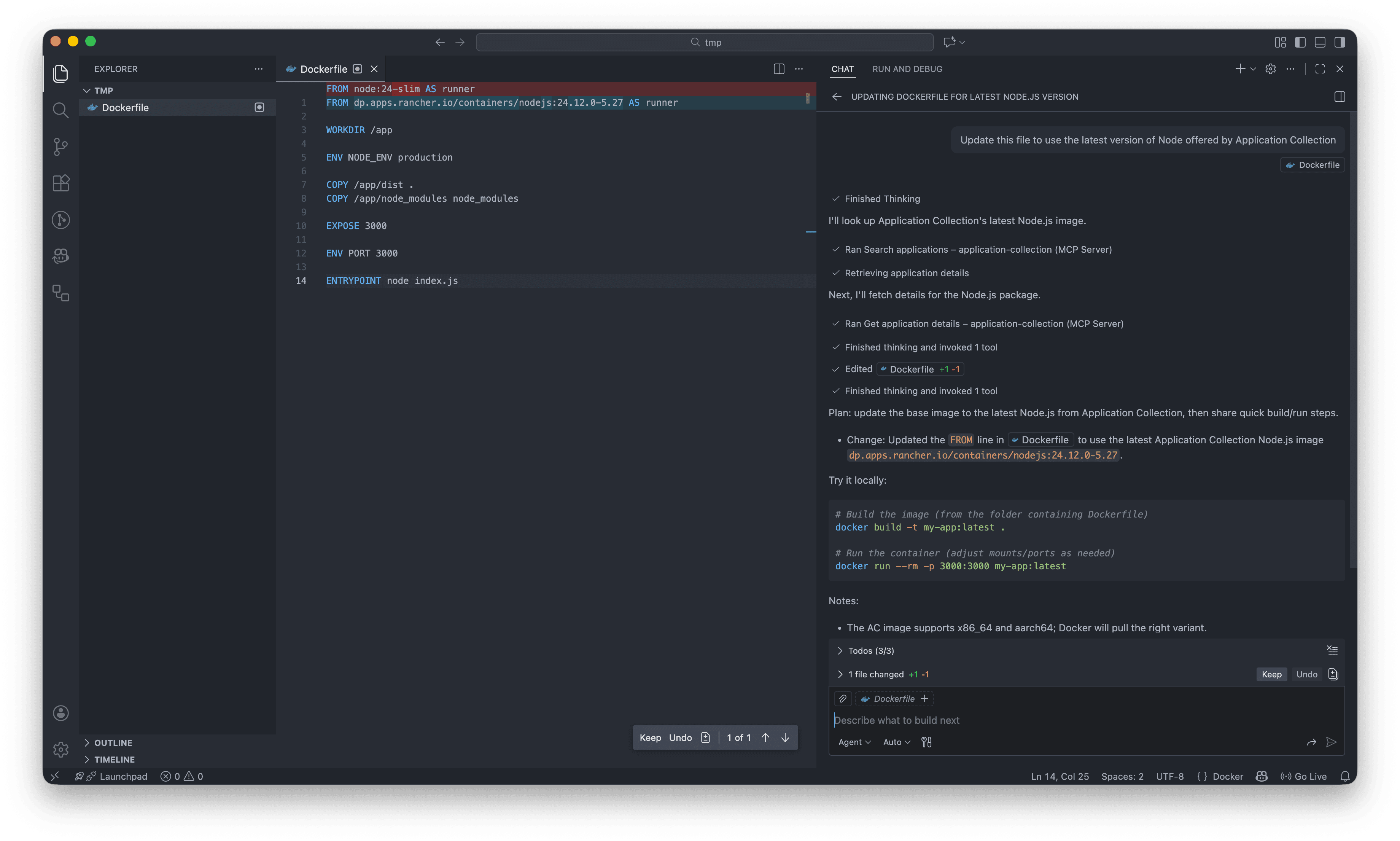
- Make sure you select
Agentmode in the chat prompt. - The agent will ask for permission to use the server tools, accept them.
- (Optional) Add the
Dockerfileto the chat context to bound the agent scope. - Results may vary depending on the LLM model, the model response, and the latest version of Node.js offered at the time of your request.
This is just the tip of the iceberg. You can ask Copilot to update a more complex Dockerfile, create a whole Helm chart, or even migrate a deployed application.